Create or Edit Collections
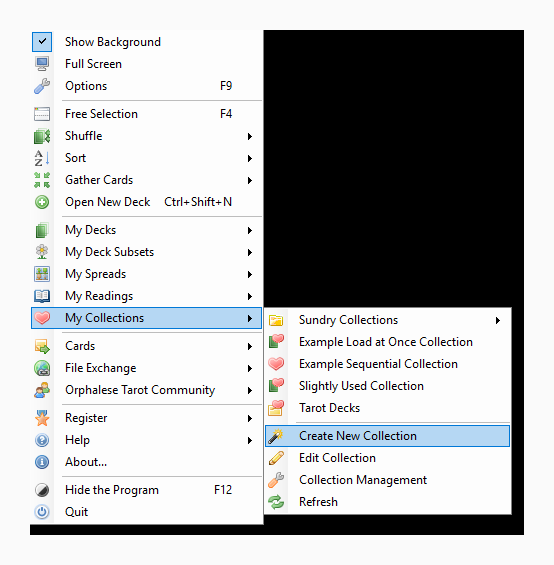
The Create or Edit Collection tool, also known as the Collection Wizard is launched from the My Collections menu, either by clicking Create New Collection or Edit Collection and browsing to the Collection you want to edit.
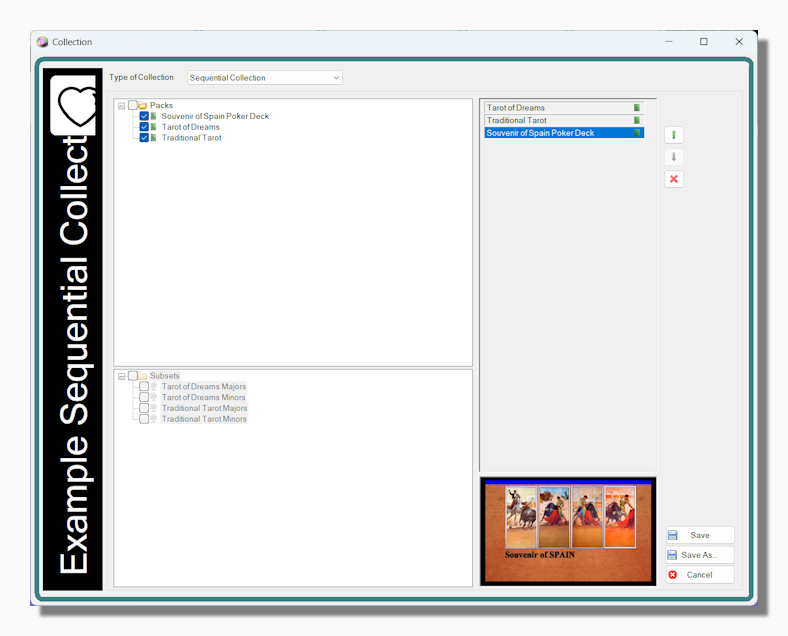
When creating a new collection the first step is to decide which kind of collection you want to create.
A Sequential collection can be loaded up into the program's memory of recent decks, allowing you to navigate through the collection using the left and right Deck Navigation Arrows as described in Switching Decks. Sequential collections are perfect for Comparative Readings when all the decks in the collection have the same number of cards and you are switching between decks to get a different take on the reading in progress.
A Load at Once collection is perfect for when there is a group of decks that you tend to use together at the same time. When you launch a collection of this kind all the decks in the collection appear side by side as Secondary Decks.
Tip: Load at Once collections can contain both decks and subsets. Unfortunately Sequential collections can only contain full decks. This is a technical limitation with the current version of the program which may be resolved in a future release.
To add decks or subsets to the collection select them in the panels on the left. As you check them they are added to the list on the right. You can change the order of the decks in the collection by clicking on any deck and moving it up and down with the arrow buttons. A deck can be removed from the collection with the delete button, which does not delete the deck itself, just removes it from the collection.
To help orientate you as you define the collection the background for each deck is show in the panel below when it is selected in the list.